 ARRF
ARRFAR Wi-Fi survey
Wi-Fi you can see.
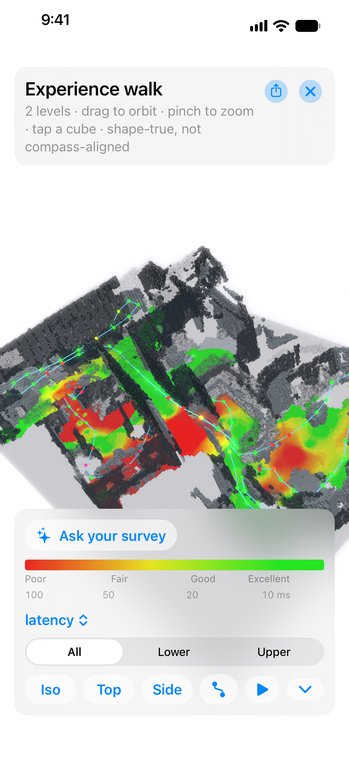
Walk the space and ARRF drops a colored cube about every second, right where you stand. Tap one to see delay, jitter, loss and speed at that spot.

iPhone · iOS 17 or laterGet supportPrivacyTerms
Features
See it where it happens.
Cubes as you walk
A cube lands about every second as you move, building a 3D heatmap in real time. Tap any cube for its measurements.
Color by what matters
Paint the cubes by Wi-Fi latency, internet latency, jitter, loss, speed and more, all on one shared legend.
A plain verdict
Grade the walk for web, streaming, video calls or gaming. Get a one-line verdict like "The Wi-Fi is the weak link, not the internet."
Room by room
Tag rooms as you walk and see each one rated, with the worst called out. File surveys under each client site.
Floor plan and dollhouse
On an iPhone with LiDAR, see your walk as a 2D map and a 3D model you can orbit.
Try it first
New installs open a simulated survey. Tap Start and walk to watch cubes drop from a virtual network.
Stays on your iPhone
There is no ARRF account, and the app has no tracking or third-party SDKs. Survey data stays on your iPhone unless you export it. Camera images are never saved.
Try it, then keep it
Free to download, with a free trial of every feature for 14 days or 3 surveys, whichever comes first. Then a one-time unlock keeps ARRF working for good. There is no subscription.
What you need
An iPhone on iOS 17 or later and any Wi-Fi network. LiDAR helps with floor plans; other iPhones survey fine. Vendor packs add data from your own access points, and the RUCKUS pack comes at no extra cost.
ARRF is an independent product of NeuralConfig LLC. It is not made, endorsed or supported by RUCKUS Networks. RUCKUS is a trademark of its owner.